
How To File For Income Tax Online (Auto Calculate For You!)

Don’t know how to file income tax? Well did you know taxpayers can do it online starting from March 1 every year, unless LHDN says otherwise? This method of e-filing is becoming very popular in Malaysia because it is simple and user friendly.
This method of filing income tax also helps you calculate your income tax automatically. So, you don’t have to worry about how to calculate and all that. Filing your tax through e-Filing also gives you more time to file your taxes, as compared to the traditional method of filing, where the deadline is usually on April 30.
If this is your first time filing your tax through e-Filing, don’t worry, we’ve got your back with this handy guide on e-Filing.
Here is how the short e-Filing process goes:
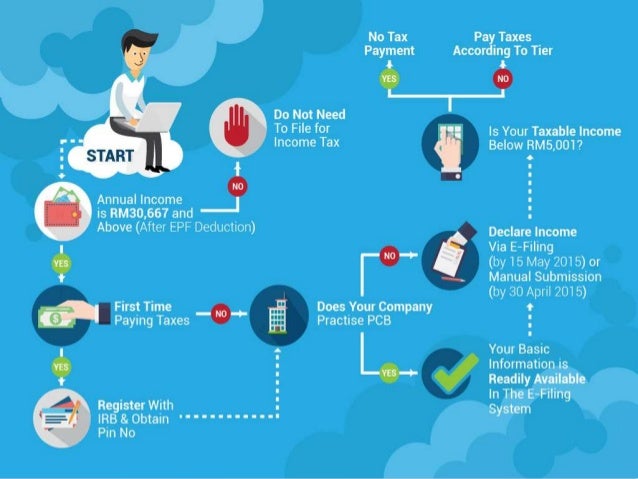
1. How to apply for my income tax online for 2019? (existing e-filing users, proceed to next step)
If you have never filed your taxes before on e-Filing income tax malaysia 2019, go to http://edaftar.hasil.gov.my/ where you can apply online for the registration of income Tax File for individuals and companies. Click on Borang Pendapatan Online in the first step of e-Daftar and then, you will have to fill up the form for registration.

After you have filled up the form, you will have to reconfirm your information. Your application number will be presented after confirmation.
IMPORTANT!
Please note down your application number for future reference!
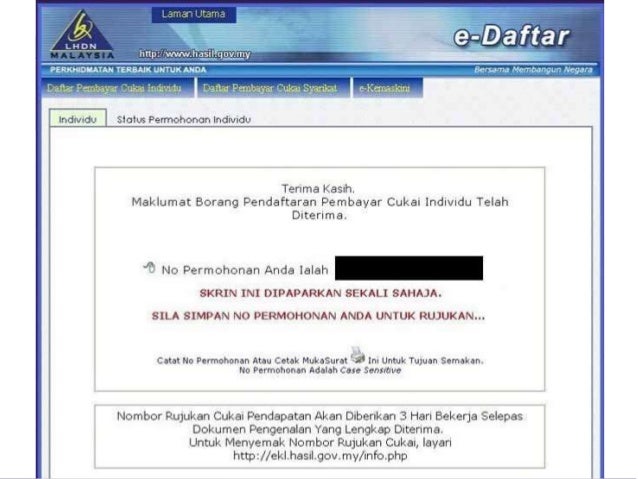
Scroll down from your application number, and click on Muat Naik Disini to upload a copy of your identity card. You have 14 days to upload it, and your identity card must fulfil the following requirements:
Once you’ve uploaded your identity card, you need to physically visit the nearest LHDN branch to obtain your PIN number. New taxpayers used to be able to do this online, but it seems like the feature has been removed – we’ll update this page if that changes!
2. Go to e-Filing website
Once you have gotten your PIN, here are the steps on how to file income tax in Malaysia.
If you already have the PIN from LHDN or an account for e-Filing, you can proceed to
LHDN’s official website (http://www.hasil.gov.my/), click on ezHASIL (https://ez.hasil.gov.my) and then click on myTax. This will lead you to the main page of the e-Filing system.
3. Login to e-Filing website
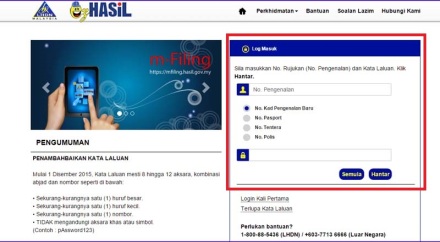
Next, key in your MyKad identification number (without the dashes), and your password.
If you are a first-timer, click on Login Kali Pertama. Then fill in your PIN and identity card number to register for an account.
4. Choose the right income tax form
Once you’ve logged in, you will be shown a list of features available on e-Filing. To begin filing your tax, click on e-Borang under e-Filing:
After clicking on e-Borang, then you will be shown a list of income tax forms. If you are an individual with non-business income, choose Income Tax Form BE (e-BE), and choose the assessment year (tahun taksiran) 2018. Remember, you file for 2018 income tax in 2019.
5. Check your details
In the first section of the form, MAKLUMAT INDIVIDU, you can check your details displayed on the form, make changes if the form is displaying incorrect information or does not display your latest information.
There will also be a “layak menuntut insentif dibawah seksyen 127” which refers to claiming incentives under section 127 of the Income Tax Act (ITA) 1976. This is incentives (such as exemptions) under the provision of paragraph 127(3)(b) or subsection 127 (3A) of ITA 1976, which is claimable as per government gazette or with a minister’s approval letter. If you are not entitled to such exemptions, choose “TIDAK BERKENAAN”.
Below that, you will see “melupuskan asset di bawah Akta Cukai Keuntungan Harta Tanah 1976”, which refers to any disposal of assets under the Real Property Gains Tax (RPGT) 1976. If you have not disposed or sold any real estate, just select “TIDAK”. Additionally, you can read up about RPGT at the LHDN website.
If you would like your income tax return 2019 to be banked into your bank account directly, this is where you need to fill in your bank account details. LHDN has numerous times assured taxpayers that bank account details will be safeguarded and not shared with any other parties.
6. Fill in your income details
In the second section, PENDAPATAN BERKANUN, JUMLAH PENDAPATAN DAN PENDAPATAN TAHUN KEBELAKANGAN YANG BELUM DILAPORKAN, you can key in your income details according to the relevant categories.
The second step is to fill in the approved donation and gifts amount. Refer to our tax deduction section to understand more about this deduction. Remember, you must ensure the organisation you donate to, is approved by LHDN. If unsure, you can check the status of the charitable organisation on LHDN website.
Check if the total monthly tax deductions (MTD/PCB) displayed is correct. You can find this information in the EA Form provided by your company.
If you have not declared any income in the previous years, this is where you declare it. For undeclared income from previous years, fill in the sub-section PENDAPATAN TAHUN KEBELAKANGAN YANG BELUM DILAPORKAN at the end of this section.
7. Fill in your tax reliefs, tax rebates and tax exemptions
In the third section, PELEPASAN/REBAT/TOLAKAN CUKAI/PELEPASAN CUKAI, key in your tax reliefs, tax rebates and tax exemptions. Check out out tax relief section to see the latest income tax relief 2018 Malaysia (Year of Assessment 2017).
Understand the tax reliefs available and identify which are applicable to you to ensure you spend wisely and save on your income tax. Make sure you retain the proof of purchase or spending for the items you are claiming for up to seven years.
8. Check the total taxes you are due or your tax return
Once you have filled up all the reliefs and rebates, the system will automatically calculate your taxes and you will know if you have balance or excess in income tax payment.
This can be seen in the last section, RUMUSAN.Your total tax will be shown in the first red box in the screenshot above. After deducting your MTD/PCB, if there is an excess or income tax return, it will be shown in the second red box in the screenshot.
9. Declare, sign and send
The final step is to declare that all the information provided is true. Then, you need to electronically sign the form and send it in by clicking on (Tandatangan & Hantar).
If you would like to check or change any information, click on KEMBALI.
That’s all! It may seem intimidating to use e-Filing form at first, but it really is easy to do. Those who did not own a computer or have Internet access could head to the special computer counters at IRB branches.
Credits: iMoney.com